Geotechnical finite element analysis you can check, line by line.
KATAI 2D is open-source finite element software for soil, rock, structures and
groundwater: excavations, foundations, slopes, consolidation, seepage and earthquake
response in one staged model. Seven constitutive models. 69 verification
cases against closed-form solutions and published benchmarks — every one with its input
file in the repository, so that any number on this site can be rerun on your machine.
No licence key, no dongle, no account. Windows x64 — a self-contained command line and a
Python package. Free for commercial and academic use.
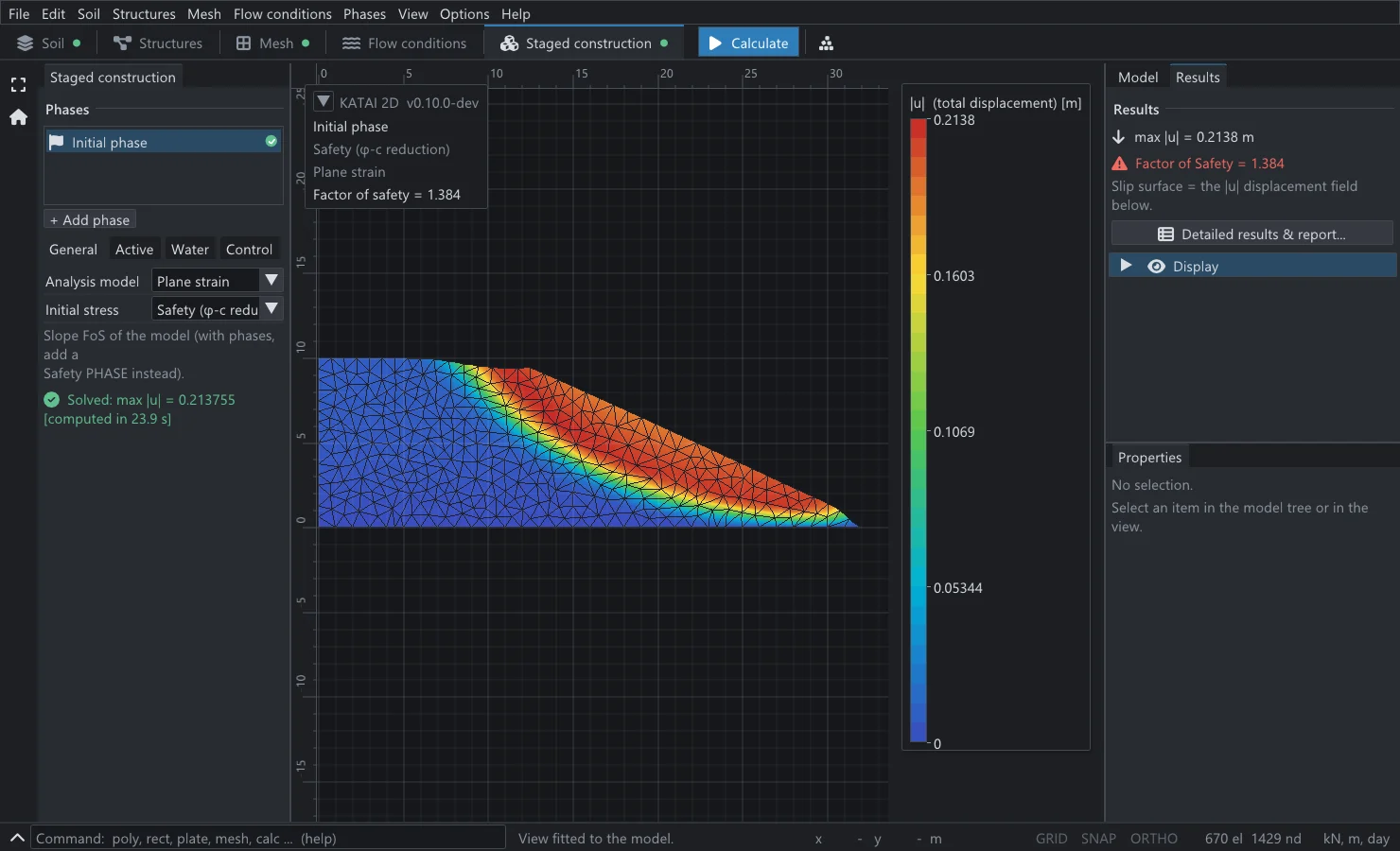
KATAI 2D — a factor of safety by strength reduction
FoS 1.384, charted 1.380. The Griffiths & Lane (1999) Example 1 slope in
the desktop application now in development. The failure mechanism is the displacement
field — found, not assumed.
PowerShell — release 0.9.0, verbatim
>katai solve kv-slp-001-griffiths-lane-slope.k2d
phase 1/1: Initial phase
phase 1/1: ok max|u| = 3.083640e-01 m FoS = 1.010
warning K2D-A005 Griffiths-Lane soil: Strength reduction with a
non-associated flow rule (material "Griffiths-Lane soil": phi =
19.6 deg, psi = 0 deg): the factor of safety depends on the mesh
and falls as the mesh is refined, because the shear band narrows
with the elements. …
solved 1 phase(s) in 8.17 s
The same method from the command line, on a second Griffiths & Lane slope whose
published factor is ≈ 0.99. The warning is the house style: a number that must be
qualified is qualified where it is produced, not in a footnote.
69verification cases, each against a closed-form solution, an independent computation or a published benchmark
207automated tests run on every push — the suite, not a brochure, is the specification
26benchmark problems checked in as plain .k2d files that anyone can rerun
7constitutive models, from Mohr–Coulomb to HS small, Soft Soil Creep and Hoek–Brown
Why KATAI 2D
Six reasons an engineer can put in a design report.
Geotechnical software is trusted with decisions that cannot be tested at full scale.
The question is not whether a program produces a result, but what stands behind it.
01
Every result has a reference
No capability ships until it reproduces an answer known independently of the program: Prandtl, Terzaghi, Charny, Cox, Griffiths & Lane, Hoek–Brown closed forms. 69 cases, each with its source, its tolerance band and its measured deviation.
The source is public, the formulation is written down equation by equation, and the input is a plain text file with a published schema. When a reviewer asks how a number was obtained, there is an answer.
A load drawn off the mesh, an analysis undefined for a material, a result that depends on the mesh — each produces a stable diagnostic, not a plausible wrong number. 37 codes; no input is ever dropped in silence.
Initial stress, staged excavation, anchors, dewatering, consolidation, a factor of safety, an earthquake — phases of one project on one mesh, with stresses and pore pressures carried from each into the next.
A model is a dozen lines of Python; results come back as NumPy arrays; a parametric study is a loop. The command line has documented exit codes and runs anywhere a script can.
Apache-2.0: commercial work, teaching, research, proprietary tools built on top. No licence server, no seat count, no expiry — and an analysis archived today can be rerun bit for bit in ten years.
Eight of the 69 verification cases. Each number is the measured deviation
from a solution that exists independently of the program, on an input file you can download.
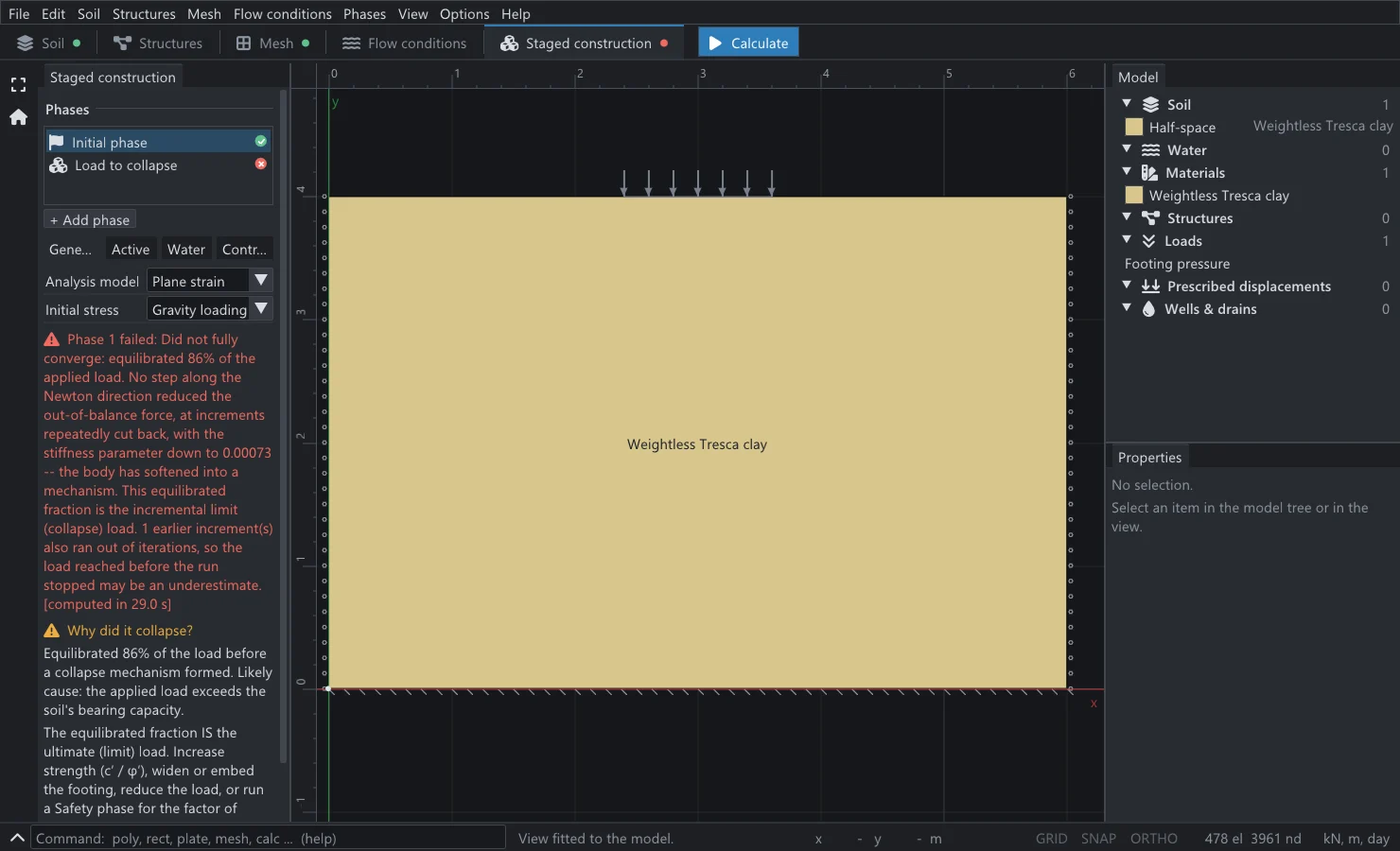
+0.6%Bearing capacity of a strip footingPrandtl (1921): Nc = 2 + πKV-FND-010
1.384Factor of safety of a slope, charted 1.380Griffiths & Lane (1999), Example 1KV-SLP-002
0.59%Stress around a tunnel in Hoek–Brown rockclosed-form elasto-plastic solutionKV-CST-016
+1.02%Seepage discharge through a damCharny (1951), exact theoremKV-FLW-001
0.0061Largest error in degree of consolidationTerzaghi (1943) seriesKV-CON-002
−0.2%Surface acceleration at resonancedamped shear-column closed formKV-DYN-002
−0.000%Deflection of a beam in bendingbeam theoryKV-STR-003
4.4×10⁻¹⁶Sparse solver against dense LUindependent code pathKV-NUM-002
Stated as the record states it: not every case is this tight. A circular footing
over-predicts its collapse load by +3.7%, and a strength-reduction factor of safety with
non-associated flow moves by about 4% over a fourfold mesh refinement. Those numbers are in
the same table as the ones above.
The soil and rock models practice relies on — with their equations.
Seven models including Linear Elastic, each with drained, undrained (A), (B), (C) and
non-porous behaviour. Every one is documented with its governing equations and verified
on a problem with a known answer.
No input file is required to get started: build the model in Python, run it, and read the
answer back. Every object is created in one call and handed back as a handle, and phases
switch those handles on and off — which is the whole of staged construction. Materials,
geometry, walls, anchors, geogrids, piles, interfaces, groundwater and every phase type are
reachable from the same surface, over the same input contract the CLI and the file use.
anchored_excavation.py — shipped in the repository, run by the test suite
import katai

prj = katai.Project("Anchored excavation", mesh_size=2.0, auto_refine=False)

# one soil, Mohr-Coulomb: kN, m, day -- units are fixed and stated
sand = prj.materials.mohr_coulomb("Berlin sand", E=3.0e4, nu=0.3,
                                  c=5.0, phi=32.0, gamma=19.0)

# ground, split so the pit can be dug out of it later
prj.geometry.rectangle(0, 0, 30, 12, material=sand, name="Below formation")
pit = prj.geometry.rectangle(0, 12, 12, 20, material=sand, name="Pit")
prj.geometry.rectangle(12, 12, 30, 20, material=sand, name="Retained ground")

# a diaphragm wall with an interface on each face, and a prestressed anchor
wall = prj.structures.plate((12, 20), (12, 6), EA=1.2e7, EI=1.0e5, w=5.0,
                            interfaces="both", name="Diaphragm wall")
anchor = prj.structures.anchor((12, 18), (20, 14), EA=2.0e5, spacing=2.5,
                               prestress=300.0, name="Anchor row 1")

# staging: handles are what phases switch on and off
prj.initial(procedure="k0", exclude=[anchor])
prj.phases.plastic("Excavate to formation", activate=[anchor], deactivate=[pit])

job = prj.run()
print(katai.summary(job, prj))
what it prints — rows abbreviated, values verbatim
=== Excavate to formation =======================================
  status        converged
  max |u|       4.329029e-02 m
  diagnostics
    NOTE  K2D-A004
          A structural element ends on a supported node. The reported
          reactions are the soil's contribution only; the element's own
          end force at that support is not included in this build.
  extremes                    min          at                 max          at
    |u|       [  m]             0  (0, 16)                 0.04329  (3, 12)
    u_y       [  m]   -0.00089196  (30, 18)               0.043216  (3, 12)
    sig'_yy   [kPa]       -376.15  (30, 0)                   5.888  (10, 12)
  structural forces (envelope |max|)
    Anchor row 1           anchor    N       195.4 kN/m
    Diaphragm wall         plate     N       325.7 kN/m   M       58.33 kNm/m
Every extreme comes with the place it occurs. “The largest settlement
is 43 mm” and “…and it is three metres from the wall” are two
different findings; the summary gives both, and a field that is uniform says so instead of
inventing a location.
A refusal is an exception, with the engine’s own words.katai.Refusal carries the message verbatim and the stable K2D-*
codes, so a script branches on the reason instead of parsing prose.
The script, the file and the desktop application are one contract.prj.save("job.k2d") at any point, and the same analysis opens in the GUI or
runs under katai solve — the test suite pins a scripted case byte-for-byte
against its checked-in file.
Results are arrays, not screenshots. Displacements, stresses, pore
pressures, reactions and structural force envelopes come back as NumPy data, so a
parameter study is a for loop.
Install
Running in one line.
Two front ends, one contract. The command line is a single self-contained executable;
the Python wheel ships the katai package and the same command line.
No licence key, no administrator rights, no dependencies.
PowerShell — the command line
>irm https://raw.githubusercontent.com/fkkarakurt/katai2d/main/install.ps1 | iex# open a NEW terminal, then:>katai info
KATAI 2D 0.9.0 (2026-08-31)
.k2d project file version: 18
.res results file version: 9
linear solver backend: eigen
The installer downloads the latest release, verifies its SHA‑256 and puts
katai on your PATH.
pip — the Python package
>pip install katai2d-0.9.0-cp312-abi3-win_amd64.whl
>python -c "import katai; print(katai.__version__)"
0.9.0
>katai info
KATAI 2D 0.9.0 (2026-08-31)
.k2d project file version: 18
.res results file version: 9
linear solver backend: eigen
One abi3 wheel serves every CPython ≥ 3.12 on Windows x64, from
Releases.
The engine is open source today. On top of it, a modelling, meshing and reporting
application is being built for engineers who would rather draw a section than script it.
Real screenshots from the working build below. It is a separate track and not part of
the open-source release.
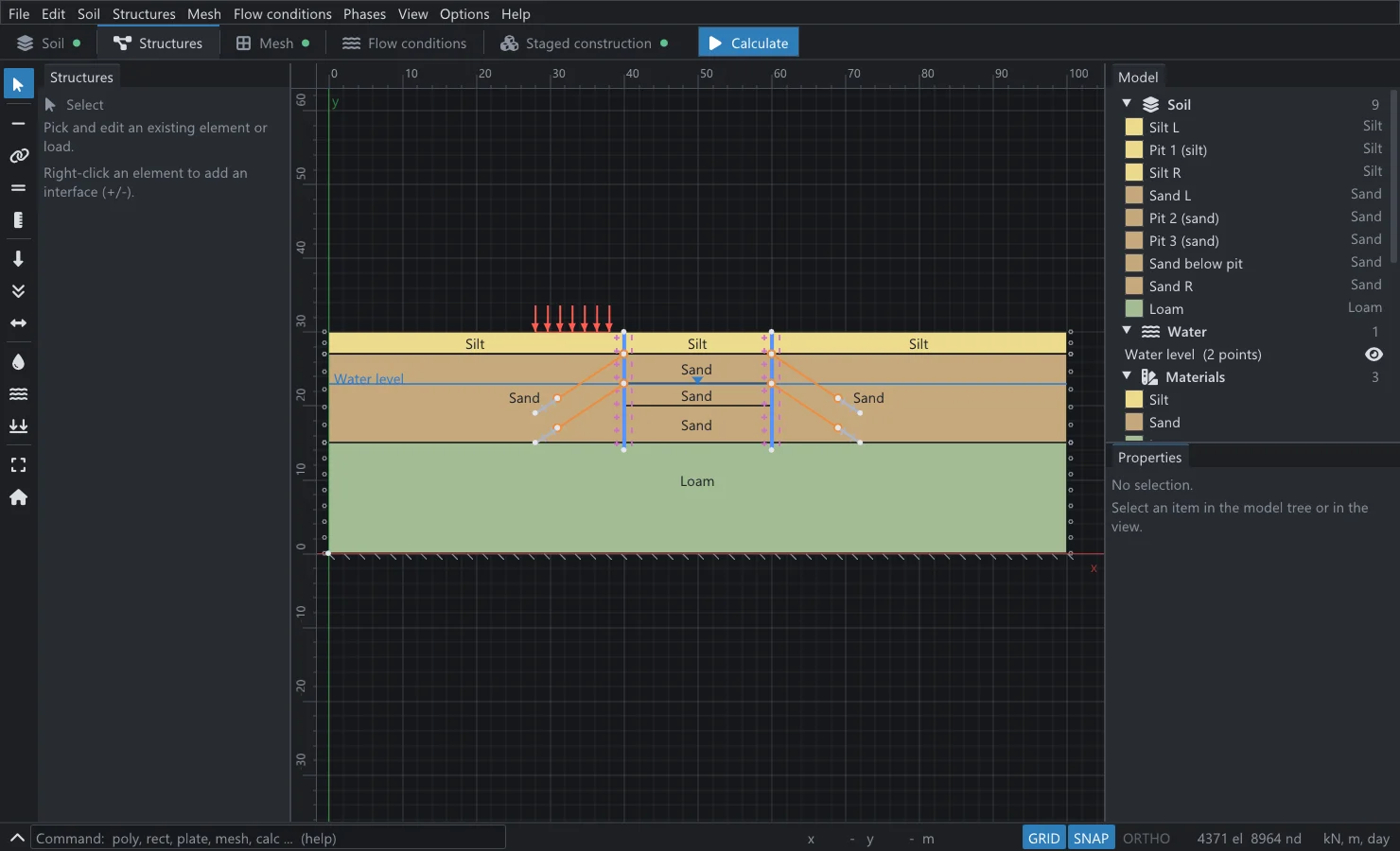
KATAI 2D — structures
Walls with interfaces, two anchor levels a side, a surcharge and the water level.
Draw the whole support system
Soil rarely stands alone. Add the structural elements of a real project and build it in the sequence it is actually constructed.
Plates, anchors, geogrids and embedded beams (pile rows)
Zero-thickness interfaces for soil–structure slip
Snapping grid, typed coordinates and DXF import
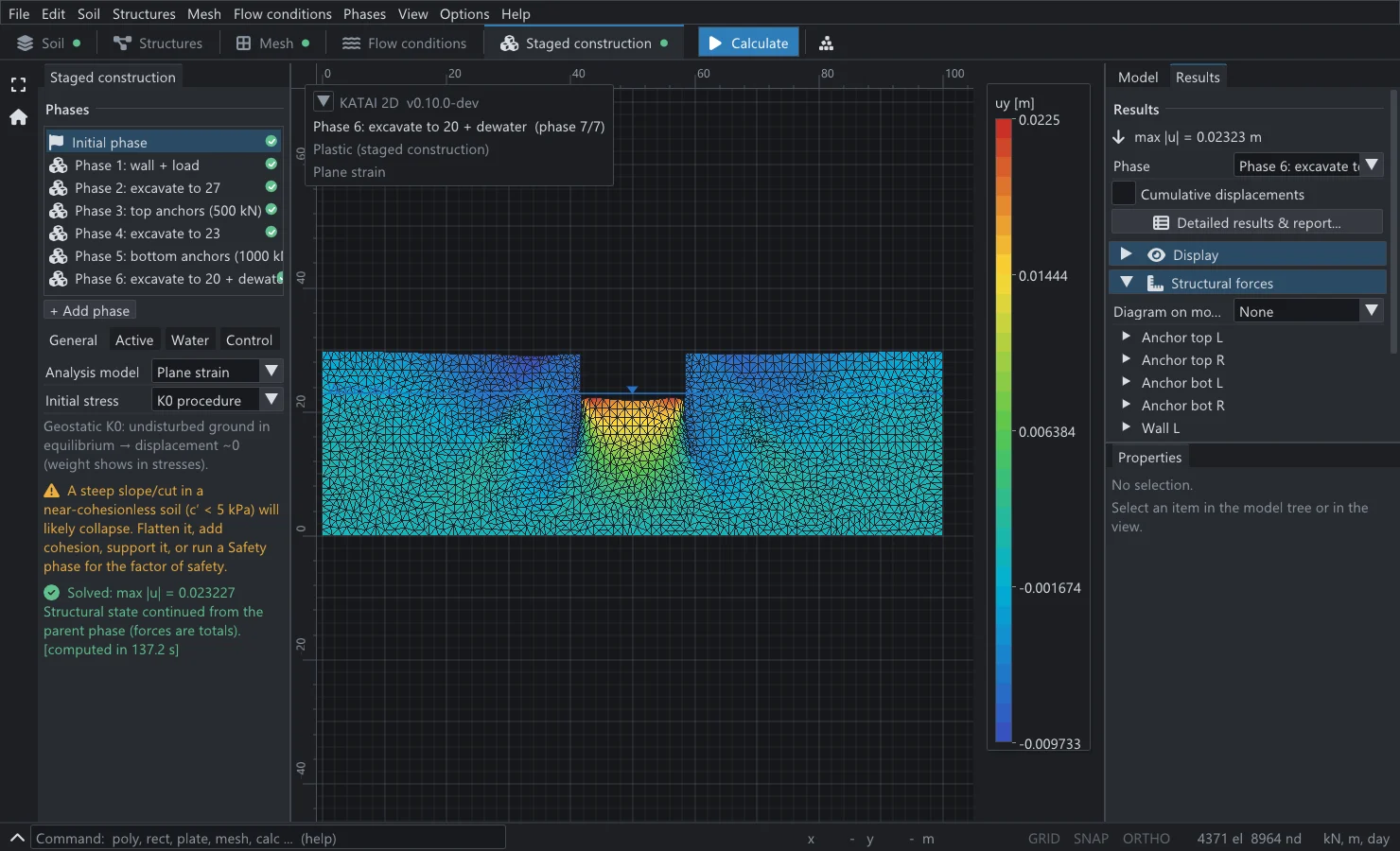
KATAI 2D — staged construction, phase 7 of 7
Seven phases, 4371 elements: pit-floor heave of 22.5 mm and the force diagrams of every member.
Results you can defend
Contours on the mesh, with a legend keyed to the true value range, phase by phase.
A capability that is not verified is not in the product. The left column is in the
open-source release now, each item with its oracle in the suite; the right column is
stated openly instead of implied.
In the open-source release
Staged construction with inherited phase activation; K0 and gravity initial stress
Safety (φ–c reduction) with an honest lower-bound flag
EC7 and TBDY 2018 partial-factor catalogues
CLI + Python front ends over one byte-pinned .k2d contract, with a JSON Schema
Not there yet
Three-dimensional analysis — KATAI 2D is two-dimensional by design
A graphical interface — the desktop application is a separate, in-development track
Liquefaction models, and suction-dependent strength (unsaturated flow is verified only in its saturated limit)
Large-deformation (updated mesh) analysis
Operating systems other than Windows x64 (the portable, Eigen-only build is the path there)
pip install katai2d from PyPI — planned; the wheel ships from Releases today
The gaps are on the roadmap, not hidden — and nothing lands without the same
verification rule: a closed-form solution, an independent computation path, or a
published benchmark.
Citation
Cite it, and cite what it rests on.
KATAI 2D is archived with a persistent DOI, so a result computed with it can be
referenced the way any other method is. If you use it in a paper, a thesis or an expert
report, please cite the software — and, where a specific number matters, the primary
source the verification matrix names for that case.
Resolves to the archived record on Zenodo. A CITATION.cff ships in the
repository, so GitHub’s “Cite this repository” button produces the same entry.
BibTeX
@software{katai2d,
  author    = {Küçükkarakurt, Fatih},
  title     = {{KATAI 2D}: an open-source, verification-first
               finite element engine for geotechnical engineering},
  year      = {2026},
  publisher = {Zenodo},
  doi       = {10.5281/zenodo.20692282},
  url       = {https://doi.org/10.5281/zenodo.20692282},
  note      = {Source: https://github.com/fkkarakurt/katai2d}
}
APA 7
Kucukkarakurt, F. (2026). KATAI 2D: an open-source, verification-first
finite element engine for geotechnical engineering [Computer software].
Zenodo. https://doi.org/10.5281/zenodo.20692282
Citing a number rather than the program? Every verified quantity in the matrix carries its
own reference — Prandtl, Giroud, Charny, Terzaghi, Griffiths & Lane, Kramer and the rest
are listed with their bibliography on the
verification page, and the same bibliography is generated into the
repository so it can never drift from the tests that use it.
About
KATAI Geotechnical Engineering.
KATAI Geotechnical Engineering develops KATAI 2D, a finite element
engine for soil and soil–structure analysis. We build computational geotechnics the way
we believe engineering software should be built: on established theory, with
readable source, and with every result verified against
a known solution before it ships. The engine, its command line and its Python package are
open source under Apache‑2.0.
Our aim is a tool a practising engineer can trust and a researcher can scrutinise — accurate
enough to rely on, transparent enough to defend in a review, an expert report or a paper.
Every capability locked to a closed-form solution, an independent computation path or a published, cited benchmark
The full automated suite runs on every push, on a build with no proprietary component
Honest reporting — refusals over silent approximation; known limitations stated, not hidden
KATAI 2D is designed and written by Fatih Küçükkarakurt,
who also maintains its formulation notes and verification record. Work, writing and contact
details are at fkkarakurt.com.
KATAI 2D is free, open-source finite element software for geotechnical engineering. It analyses deformation, stability, groundwater flow, consolidation and seismic response of soil, rock and soil–structure systems in two dimensions — plane strain and axisymmetry — and is driven from a command line, from Python, or from a plain text project file. Its distinguishing principle is verification: every capability is pinned to a closed-form solution, an independent computation path or a published benchmark, and the record of 69 such cases ships with the source.
Is KATAI 2D really free? Can I use it commercially?
Yes. The engine, the katai command line and the Python package are open source under the Apache License 2.0, which permits commercial use, modification and redistribution without fee. There is no licence key, no dongle, no node-locking, no account and no time limit.
Which constitutive models are available?
Seven: Linear Elastic; Mohr–Coulomb with a tension cut-off and a dilatancy cut-off; Hardening Soil; HS small (Hardening Soil with small-strain stiffness); Soft Soil; Soft Soil Creep; and the generalised Hoek–Brown criterion (2002) for rock, entered as σci, mi, GSI and D. Each soil model can be drained, undrained (A), (B) or (C), or non-porous.
What can it not do?
Three-dimensional analysis (it is two-dimensional by design); liquefaction and cyclic pore-pressure generation; suction-dependent strength of unsaturated soil; large-deformation (updated mesh) analysis; discrete jointed rock. Released binaries are for Windows x64 only, and the open-source release has no graphical interface. These limits are stated on the features page rather than left to be discovered.
How accurate is it?
On problems with exact or published answers, measured on the input files that ship in the repository: Prandtl’s bearing capacity factor +0.6%; the Davis & Booker footing +1.4%; the Cox circular footing +3.7%; the Giroud rigid footing +1.1%; the Charny dam discharge +1.02%; Terzaghi consolidation −1.2% to −0.4%; resonance of a soil column −0.6% and −0.2%; a Hoek–Brown tunnel 0.59% and 0.72%; beam deflection −0.000%. The full record of 69 cases, with every tolerance band, is on the verification page.
How do I install it?
For the command line, run one line in PowerShell: irm https://raw.githubusercontent.com/fkkarakurt/katai2d/main/install.ps1 | iex — it downloads the latest release, verifies its SHA-256 and puts katai on your PATH, without administrator rights. For Python, download the wheel from the GitHub releases page and pip install it; one wheel serves every CPython from 3.12 onwards. Publication on PyPI is planned.
Is there a graphical interface?
Not in the open-source release, which is a command line and a Python package. A desktop application with drawing, meshing, staged construction, result contours, force diagrams and report generation is in development on the same engine as a separate track; real screenshots are on the desktop page, and there is a list to join for the preview.
How do I cite KATAI 2D?
Cite the software through its archived record: Küçükkarakurt, F. (2026). KATAI 2D: an open-source, verification-first finite element engine for geotechnical engineering. Zenodo. https://doi.org/10.5281/zenodo.20692282. A CITATION.cff file ships in the repository, so GitHub’s “Cite this repository” button produces the same entry. Where a specific number matters, cite also the primary source the verification matrix names for that case.